In the past year, I've taken an interest in compilers. Being a curious person, I wanted to uncover all that mystery beneath the nicely defined abstract interface of programming languages. Like an invisible splinter stuck in my finger, it has always bugged me not knowing how something works, yet to continue to use it in my day to day work. So like any sensible person would do, I went and bought some books on the subject.
I started my journey by reading "Compilers Principle, Techniques, & Tools", or as it's commonly referred to: "The Dragon Book". It's pretty theory heavy and is more of a university text book. I wasn't able to fully grasp the concepts without actually putting theory into practice, which is where the second book comes in. After reading almost half a book, I decided to switch up and put my knowledge to use by reading a more practical book: "Crafting Interpreters". Now, I've got to say that this book was a lot of fun, because I've got to see the things that I've learnt from the first book put into actions. The interpreter book takes the reader through 2 implementations of a dynamic programming language specifically designed for the book. The first implementation was written in Java as an abstract syntax tree walker, and the second implementation was written in C as a byte code virtual machine. The Markdown transcompiler that I've implemented, the subject of this post, utilises knowledge I've learnt from both books.
A transcompiler (or a more modern name of: transpiler) is a compiler that compiles one language to another of the same or similar level. Converting a Typescript program to Javascript, for example, uses a transpiler. The web browser engine can't natively interpret Typescript, therefore it has to be converted to Javascript first.
The compiler that I've implemented is a transcompiler that compiles Markdown to HTML. Both Markdown and HTML are markup langauges. My compiler just compiles from one markup language to another. It's not a programming language compiler in the traditional sense. I'll use "transcompiler" and "compiler" interchangeably in this post.
I implemented this transcompiler, because I wanted to put my knowledge to use, and I thought that a simple project like this should be enough to get things moving. I also have a practical reason for this project, which is that I enjoy writing the blog posts but don't want to have to deal with all the hassle of HTML tags. This project enables me to write in Markdown and converts it to HTML for the web. This post that you're reading right now was written in Markdown and compiled to HTML using the compiler I've implemented. The only part that wasn't in the Markdown file is the "Navigation bar" at the top of the page, which could have been in this Markdown file, but I'm saving that part for a future project.
The compiler consist of 5 components:
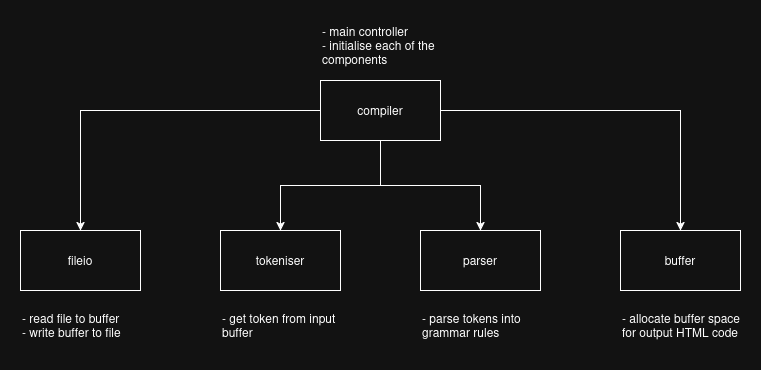
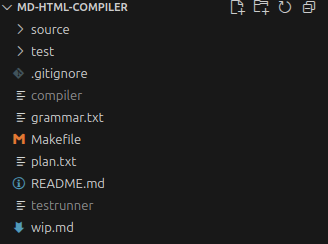
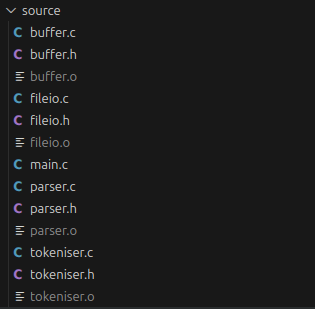
Each components has their own job to do. The compiler component is the main controller that controls all the other components. It initialises each of the components before calling the Parser to parse the tokens into their appropriate grammar rule/production.
The fileio components job is to read the source Markdown file into a buffer. This source buffer is utilise by the tokeniser to produce tokens for the parser to consume. Another job of fileio is to write the output buffer to an output HTML file. Once the parser has done its job and written the HTML code to the output buffer, the buffer is written to an HTML file.
The tokenisers job is to go through the input buffer, byte by byte, to form lexemes for tokens.
The parsers job is to take tokens (identified by the tokeniser) and identify which grammar production rule to follow. Once identified, it writes the HTML code associated with that grammar production rule to the output buffer.
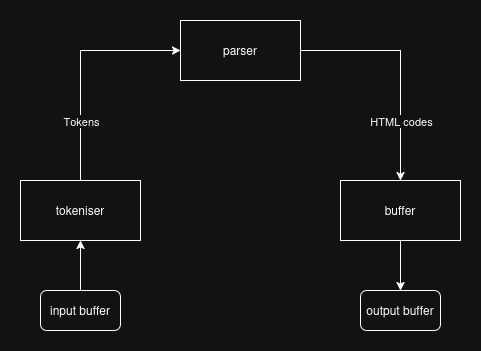
The majority of the work done in my compiler is in the parser. This is because my compiler is a single-pass compiler. The parser, instead of creating an Abstract Syntax Tree (AST) or some Intermediate Code (IC), directly produces the output code by itself. This is done with the help of a technique called Syntax-Directed Translation (SDT).
SDT is a technique where program fragments are attached to the productions of a grammar. The program fragments are executed as the productions are matched/selected. There are many applications for using SDT from simply creating a parse tree, converting expressions format, to even converting a high level code into three address code.
In my compiler, I'm using SDT to do the simple task of writing HTML code associated with the grammar production to the buffer. For example, I've got a heading grammar production that specifies what a heading element in Markdown looks like. I've added a program fragment to the production that writes the HTML heading tags to the buffer along with the content of the heading. The grammar production below shows the SDT scheme of heading:
heading -> ("#")+ (SPACE | TAB)+ { write("<h?>") } content { write("</h?>") }
Most of the productions are straightforward and the program fragments can be added as shown above, but some requires special attention because their convertion from Markdown to HTML doesn't perfectly match. An example of this is the image and link productions.
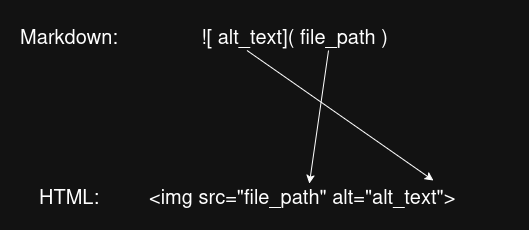
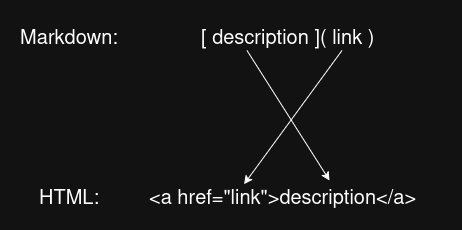
image       ->      "!" "[" (STRING | NUMBER | SPACE | TAB)+ "]" "(" STRING ")" (NEWLINE | EOF)
link        ->      "[" (STRING | NUMBER | SPACE | TAB)+ "]" "(" STRING ")"
With these 2 productions, I couldn't just write the HTML opening tag to the buffer, then write the content afterwards, because the content in Markdown is in reversed order of the HTML syntax. To solve this issue, I implemented my parser to skip through the alt_text/description first, then grab the file_path/link and write them to the buffer, then go back to grab the alt_text/description and write them to the buffer. This wasn't too difficult to implement since the tokens all have pointers to their lexeme character pointer in the source memory block. All I had to do was save the starting token of the alt_text/description section in a variable, then use its lexeme pointer to go back to it afterward.
Note that as I'm proofreading this now, I just realised that I could have just swapped the src and alt attributes order in the img tag: <img alt="image alt text" src="image.png">. That would have prevented me from having to implement this little solution for the image production.
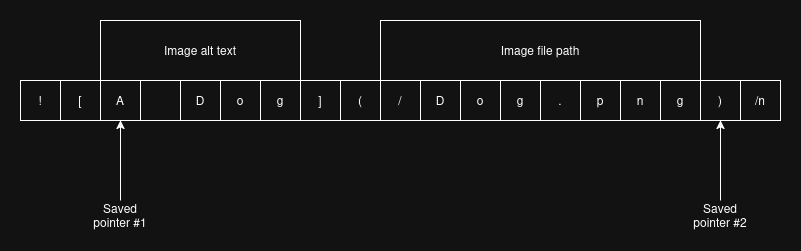
The code snippet below shows my implementation of the image production:
    // 2 advance() to skip through the exclamation mark and open
    // square bracket.
    advance();
    advance();
    // Now, at the beginning of the alt text section.
    // Save the tokens pointer.
    Token altTextPrevToken = parser.previousToken;
    Token altTextCurrToken = parser.currentToken;

    writeToBuffer("<img src=\"", 10);

    // This loop skip through the alt text section.
    while (parser.currentToken.type != TOKEN_CLOSE_SQUARE_BRACKET) {
        advance();
    }
    // 2 advance() to skip through the close square bracket and
    // open parenthesis token.
    advance();
    advance();
    // Write image link to buffer.
    while (parser.currentToken.type != TOKEN_CLOSE_PARENTHESIS) {
        writeTokenToBuffer(parser.currentToken);
        advance();
    }

    writeToBuffer("\" alt=\"", 7);

    // Save the token pointer that's pointing to the end of
    // this production, so that the parser can return to this
    // pointer after finishing with the alt text section.
    Token closingParenPrevToken = parser.previousToken;
    Token closingParenCurrToken = parser.currentToken;

    // Reset both tokeniser and parser back to the image
    // alt text section.
    restoreParserAndTokeniser(altTextPrevToken, altTextCurrToken);

    // Write image alt text to buffer.
    while (parser.currentToken.type != TOKEN_CLOSE_SQUARE_BRACKET) {
        writeTokenToBuffer(parser.currentToken);
        advance();
    }

    writeToBuffer("\">\n", 3);

    // Set both tokeniser and parser to the state at the end
    // of the image rule, which is the closing parenthesis token.
    restoreParserAndTokeniser(closingParenPrevToken, closingParenCurrToken);
The restoreParserAndTokeniser(PrevToken, CurrToken) function just sets the global Token variables, which basically means to point the compiler to where those tokens are in the source. It can be use to move the compiler forward or backward in the source without having to go over each characters one at a time in the source.
Overall, with the help of SDT, I was able to implement my compiler as a single-pass compiler. This means that my compiler goes through the source code once and generate the output code right then and there. No need for any intermediate representation inbetween. Thought intitially, I did thought of outputting a syntax tree as an intermediate representation of the source and then having a code generator run through the tree to produce the HTML code, but then I found that it's more straightforward and better for the performance to just use SDT to do a single pass.
document            ->  section*
section             ->  heading
                        | bullet-list
                        | number-list
                        | code
                        | image
                        | paragraph
heading             ->  ("#")+ (SPACE | TAB)+ content
bullet-list         ->  bullet-point+
bullet-point        -> "-" (SPACE | TAB)+ content
number-list         ->  number-point+
number-point        ->  NUMBER "." (SPACE | TAB)+ content
paragraph           ->  content
content             ->  (STRING | NUMBER | SPACE | TAB | inline-code | link)+ (NEWLINE+ | EOF)
inline-code         ->  "`" (STRING | NUMBER | SPACE | TAB)+ "`"
code                ->  "`" "`" "`" NEWLINE (STRING | NUMBER | SPACE | TAB | NEWLINE)+ "`" "`" "`" (NEWLINE+ | EOF)
image               ->  "!" "[" (STRING | NUMBER | SPACE | TAB)+ "]" "(" STRING ")" (NEWLINE+ | EOF)
link                ->  "[" (STRING | NUMBER | SPACE | TAB)+ "]" "(" STRING ")"


NUMBER              -> ("0" | ... | "9")+
STRING              -> (ALPHANUMBERIC | SPECIAL_CHARACTER )+
SPACE               -> " "
TAB                 -> "\t"
NEWLINE             -> "\n"
EOF                 -> "\0"
Above is the complete grammar for Markdown that my compiler uses. The starting production is document -> sections*. I've identified that a single page of document is a collection of sections. Each section has their own type. A section could be a paragraph, a code snippet, or a heading etc. Within each of the section type, the grammar becomes more specific. For example, the heading production must starts with at least 1 # followed by at least 1 SPACE or TAB, then the content. The most important thing about a section is that they must be separate by NEWLINE character(s). The ending NEWLINE is used like a marker to tell the compiler that the section is done.
Notations:
DIGIT -> 0; DIGIT -> 1; DIGIT -> 2 ...The tokeniser is basically the starting point of the compiler after the source has been read into a buffer. The tokeniser read one byte of character from the buffer at a time and attempt to identify what it is. Once the lexeme has been identified, a Token struct is created from the lexeme, and the token is passed to the Parser. A Token struct has the following members:
typedef struct {
    TokenType type;
    const char* start;
    int length;
} Token;
start is the pointer (memory address) of the starting point of the token's lexeme. length is how long the token lexeme is. By storing only the memory address and the length of the lexeme, the compiler doesn't need to allocate additional memory for storing each identified token individually.
type is the type of token:
typedef enum {
    TOKEN_H1, TOKEN_H2, TOKEN_H3, TOKEN_H4, TOKEN_H5, TOKEN_H6,
    TOKEN_SPACE, TOKEN_TAB,
    TOKEN_NEWLINE,
    TOKEN_EOF,
    TOKEN_STRING, TOKEN_NUMBER,
    TOKEN_LESS_THAN, TOKEN_GREATER_THAN, TOKEN_GRAVE_ACCENT,
    TOKEN_OPEN_SQUARE_BRACKET, TOKEN_CLOSE_SQUARE_BRACKET,
    TOKEN_OPEN_PARENTHESIS, TOKEN_CLOSE_PARENTHESIS,
    TOKEN_PERIOD, TOKEN_EXCLAMATION_MARK, TOKEN_MINUS, TOKEN_ASTERISK,
} TokenType;
Producing lexemes and identifying what kind of token it is is simple. It's just a simple state machine i.e. a bunch of if-else. The code snippet below shows the entry point of the tokeniser.
Token getNextToken() {
    tokeniser.start = tokeniser.current;

    if (isAtEOF()) {
        return makeToken(TOKEN_EOF);
    }

    char currentChar = advance();

    if (isAlphaOrSpecialChar(currentChar) || isDigit(currentChar)) {
        return getLiteralToken(currentChar);
    }

    switch (currentChar) {
        case '#':
            return getHeadingToken();
        case ' ':
            return makeToken(TOKEN_SPACE);
        case '\t':
            return makeToken(TOKEN_TAB);
        case '\n':
            return makeToken(TOKEN_NEWLINE);
        ...
The only non-simple part of the tokeniser is the string and number literals. These 2 tokens are the only tokens that have more than 1 byte of length (apart from the heading token). Once the first character in the lexeme has been identified to be a digit or an alphabet, then the tokeniser keep on moving onto the next character in the source until it identify the lexeme's end. Each time the tokeniser move to the next character in the lexeme, the length counter is incremented. Once the lexeme is complete, the length counter is return in the Token struct.
A STRING token can consist of special characters, however the special characters must be non-reserved characters only. Special characters such as "#", "{", or "`" etc. are reserved for the compiler. These reserved characters are of Markdown syntax keywords. The compiler need to "see" these reserved special characters as their own tokens in order for the Parser to correctly identify which grammar production to follow.
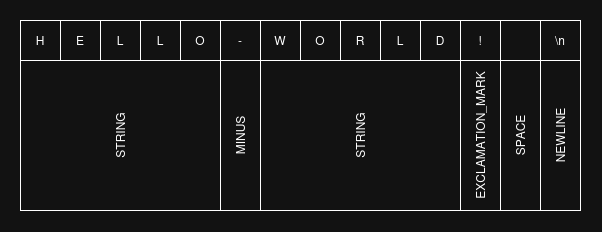
The parser I've implemented for this compiler is a predictive parser, a type of recursive descend parser that uses lookahead to select the appropriate grammar productions. In the implementation, each grammar production has their own function that the parser can "descend" into. Within each of the production function there are program fragments (as described in the Syntax-Directed Translation section) that output the HTML tags (to buffer) associated with the production.
Before selecting which production to follow, the parser does multiple tokens lookahead of the source. This is necessary for the parser to do, so that it doesn't have to backtrack through a production midway. Productions that have closing token(s) such as image, link, and code etc. benefits from this lookahead.
Below is the entry pointer of the parser. The opening HTML document tag is written to the buffer before descending into the section production. After all the section productions has been matched and executed, the closing HTML document tag is written to the buffer. The EOF (End Of File) token is used as the indicator that all sections has been matched.
void parse() {
    writeToBuffer("<!DOCTYPE html>\n", 16);
    writeToBuffer("<html>\n", 7);

    advance();
    while (parser.currentToken.type != TOKEN_EOF) {
        sectionRule();
    }

    writeToBuffer("</html>\0", 7);
}
Within the section production function, the parser uses the is?Rule() to do multiple lookaheads of tokens to check which production is valid before selecting the production to descend into. Note that the paragraph production is a catch-all production for any string of tokens that doesn't fit into any of the other productions.
void sectionRule() {
    if (isHeadingRule()) {
        headingRule();
    } else if (isImageRule()) {
        imageRule();
    } else if (isCodeRule()) {
        codeRule();
    } else if (isBulletListRule()) {
        bulletListRule();
    } else if (isNumberListRule()) {
        numberListRule();
    } else {
        // A catch-all rule, when all other rules
        // are invalid.
        paragraphRule();
    }
}
The tokens lookahead functions are implemented similarly to their production function counterpart. The only difference is that the lookahead functions doesn't write the tokens to the buffer. It skips through and look for important tokens used for the identification of grammar productions. Whether the lookahead function found the production to be valid or invalid, at the end before it returns the result, it always restore the compiler back to the state before it does the lookahead.
Below is the implementation of the image production lookahead function. Note how similar it is to its production function shown in the Syntax-Directed Translation section.
/**
* Do multiple tokens lookahead to determine whether it is
* an image rule or not.
* image rule format: 
*/
bool isImageRule() {
Token originalPrevToken = parser.previousToken;
Token originalCurrToken = parser.currentToken;
if (parser.currentToken.type != TOKEN_EXCLAMATION_MARK) {
return false;
}
advance();
if (parser.currentToken.type != TOKEN_OPEN_SQUARE_BRACKET) {
restoreParserAndTokeniser(originalPrevToken, originalCurrToken);
return false;
}
advance();
while (
parser.currentToken.type != TOKEN_CLOSE_SQUARE_BRACKET &&
parser.currentToken.type != TOKEN_NEWLINE &&
parser.currentToken.type != TOKEN_EOF
) {
// Skip through image alt text section.
advance();
}
// If a closing square bracket hasn't been found, then
// it's not an image rule.
if (parser.currentToken.type != TOKEN_CLOSE_SQUARE_BRACKET) {
restoreParserAndTokeniser(originalPrevToken, originalCurrToken);
return false;
}
advance();
// If a opening parenthesis hasn't been found, then
// it's not an image rule.
if (parser.currentToken.type != TOKEN_OPEN_PARENTHESIS) {
restoreParserAndTokeniser(originalPrevToken, originalCurrToken);
return false;
}
advance();
while (
parser.currentToken.type != TOKEN_CLOSE_PARENTHESIS &&
parser.currentToken.type != TOKEN_NEWLINE &&
parser.currentToken.type != TOKEN_EOF
) {
// Skip through the image link section.
advance();
}
// If a closing parenthesis hasn't been found, then it's
// not an image rule.
if (parser.currentToken.type != TOKEN_CLOSE_PARENTHESIS) {
restoreParserAndTokeniser(originalPrevToken, originalCurrToken);
return false;
}
advance();
if (
parser.currentToken.type == TOKEN_NEWLINE ||
parser.currentToken.type == TOKEN_EOF
) {
// In the image rule, the closing parenthesis must be
// followed by a newline or a EOF token.
restoreParserAndTokeniser(originalPrevToken, originalCurrToken);
return true;
}
restoreParserAndTokeniser(originalPrevToken, originalCurrToken);
return false;
}
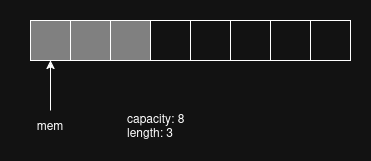
When the Parser writes the output HTML to the buffer, it does it through this component. The Buffer component dynamically allocate memory for the parser to write its output too. The Buffer component provides an interface over the memory buffer. It keeps track of the buffer memory address (pointer), the capacity of the buffer (how much has been allocated), and the length (how many bytes in the allocated memory is used up).
typedef struct {
    char* mem;          // Buffer memory address.
    int capacity;       // Capacity of the buffer.
                        // Use for determining when to expand
                        // the buffer.
    int length;         // Occupied space in the buffer.
} Buffer;
Once capacity has been reached, Buffer allocate additional memory to the existing allocated memory block. My implementation increases the buffer capacity by multiplication of 2 on every memory reallocation.
void expandBuffer() {
    // Increase the buffer capacity by multiplication of 2 each time it is expaned.
    int newCapacity = buffer.capacity << 1;
    char* result = (char*)realloc(buffer.mem , newCapacity * sizeof(char));
    // If C is unable to allocate anymore memory space,
    // then free the buffer memory and exit the program.
    if (result == NULL) {
        free(buffer.mem);
        exit(1);
    }

    buffer.mem = result;
    buffer.capacity = newCapacity;
}
writeToBuffer("</html>\0", 7);
Note that when the parser write the closing HTML document tag to the buffer, it ends the string with a \0 character. This is known as the null string termintor (or null byte because it has a byte value of 0). This null string terminator is used by C to identify when to stop reading or writing a string of data. My compiler uses C's standard IO library to write the buffer out to a file, and without the null byte, it would just keep on writing out bytes of data until it find a null byte in memory.
Also, one might wonder what happens if one wants to write the number "0" out to a file. Wouldn't that abruptly stop the writing process, because it found a byte of 0 value? The answer is: it wouldn't abruptly stop, but will correctly write out "0" to the file. This is because the ASCII decimal value of the number "0" is 48, not 0. When calling the print function, the formatting string is pass into the function, and the number 0 is pass as the argument. It's likely that the print function implementation converts the 0 int into it's ASCII decimal value first before writing it to the file.
fprintf(fptr, "%d", 0);
The Compiler component (or Main) is the thing that ties everything together. Its reponsibility is to initialise all the other components with the required data. Once successfully compiled, it also need to destroy the buffers allocated memory block before exiting the program.
void compile(const char* markdownPath, const char* htmlPath) {
    char* source = readFile(markdownPath);

    initTokeniser(source);
    initBuffer();
    parse();

    Buffer outputBuffer = getBuffer();
    writeFile(htmlPath, outputBuffer.mem);

    destroyBuffer();
}
This is only a first version of the compiler. There're still many features I haven't implemented yet such as text bold and italic, tables, and escaping syntax etc. Bold and italic shouldn't be too difficult, since I've already got the tokens in place. Escaping syntax is probably on the same level too. I think I should be able to use the backward slash as a way of escaping syntax. I haven't really thought about how to implement tables yet though.
I'm glad I worked on this project. I was able to put what I've learnt into practice and created something useful for myself. Given that it's only a compiler for a markup language, it wasn't too difficult to implement and I think this benefited me. If it was for a programming language, I think it would have taken me longer than 7 days to implement. Better to start small and finish, than to not finish at all.