For the past few weeks, I've been working on writing an Activity Logger program (https://github.com/thanakritlee/alog). The work was good. I was able to utilise many of the Linux system calls to implement the main program, as well as the test program; I even got to put a little lexer and parser into the program for formatting output. The most challenging part though, was probably figuring out how to test the program.
Many of the results and errors of the program are printed out onto the terminal, this means that they're written to the terminal device file /dev/tty. The terminal device file is opened automatically by the terminal shell as 3 File Descriptors (fd): 0 (STDIN), 1 (STDOUT), and 2 (STDERR). The fd's are inherited by the program process when the shell execute the program.
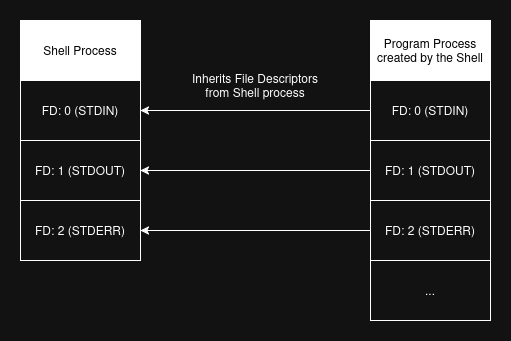
User input, such as what the user typed into their terminal gets written into STDIN. Programs can then read from the STDIN fd to see what the user has typed. STDOUT and STDERR are used by programs to write data to be printed onto the terminal; STDOUT is generally use for writing programs output and result, while STDERR is use for writing error messages.
Ignoring the 3 standard terminal fd's, programs can also choose to open the terminal device as additional fd's. SUSv3 (The Single UNIX Specification) specifies that opening a file (syscall: open(pathname, flags, mode)) will always return a new File Descriptor of the lowest available value. This means that, given there are the 3 standard terminal fd's, if the program open another file (e.g. some text file, or /dev/tty etc.) then the new File Descriptor for that opened file will be 3.
Although, Linux isn't officially SUSv3 compliance, it's however is near-compliance, and that's good enough for what I'm doing.
The simple explanation is that a File Descriptor is like an ID of an opened file of the process. Each process has a table of File Descriptors i.e. a table listing the files that the process has opened. These fd's can be use in system calls to read, write, or do other things with the file.
The more complex explanation is that a File Descriptor points to a system-wide object which represent the opened file. This object lives in another table called the system-wide opened file table. This system-wide object, sometimes called opened file handle, contains information about opened files of the whole system. This means that each process has File Descriptors that points to opened file handles in this table. The opened file handle then points to an entry in another table, called the I-node table, which contains the metadata of the file e.g. ID, size, timestamps, permissions etc. There is a separation between the system-wide opened file table and the I-node table because the opened file handle contains the opened file metadata such as the current offset of the file (i.e. where in the file it's currently pointed to), file opening options, and file access modes etc.
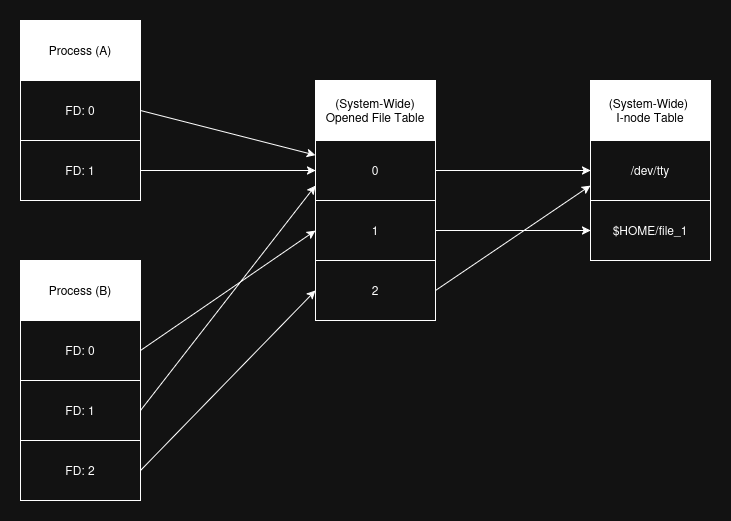
The following things happens when opening a file:
An opened file handle isn't exclusive to a single fd. Multiple fd's can point to the same opened file handle. This can be achieved by using the dup(fd_to_dup) system call. File Descriptors from multiple processes could even point to the same opened file handle. This can be achieved by the fork() system call, where a process creates another process and the File Descriptors are inherited by the child process from the parent.
We can see what File Descriptors a process has by going to the directory: /proc/$PID/fd, where $PID is the process ID. For example, if we go to the /proc/$PID/fd directory of the shell process, then we'll see the 3 standard terminal fd's: 0, 1, and 2. The /proc directory is a virtual file system that allow us to view information about the kernel. Each /proc/$PID directory contains the process information.
The following is the content of the /proc/$PID/fd directory of my bash shell process:
0 -> /dev/tty1
1 -> /dev/tty1
2 -> /dev/tty1
255 -> /dev/tty
The special thing about the STDIN, STDOUT, and STDERR File Descriptors is that if a program is executed from a shell, the program's process inherites these File Descriptors from its parent process, which is the shell process. The shell has a special capability called I/O redirection and piping. I/O redirection enables the user to tell the shell to use other files for the standard I/O File Descriptors, instead of the usual /dev/tty (terminal) device file. This allows the user to do something like this: $ prog 1> out_file 2> err_file to redirect the STDOUT to the file out_file and the STDERR to the file err_file. When doing I/O redirection, the shell process sets the appropriate File Descriptors being redirected before creating the child program's process.
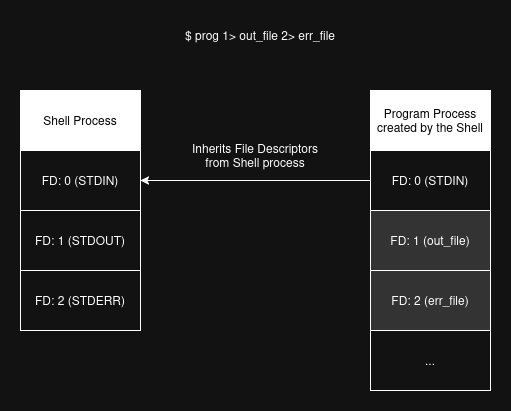
In the implementation of my alog program, I had to write test cases that assert STDOUT/STDERR output from the main alog program. On success, alog would write its result to STDOUT along with a success message. On error, alog would write an error message to STDERR. My test cases need to read the data written to STDOUT and STDERR by the alog program. At the same time, my test cases also need to write out the test result to either STDOUT or STDERR depending on whether the test passed or failed. To satisfy these requirements I had to do some I/O "redirections" within the test program.
The problem can be broken down into 2 steps:
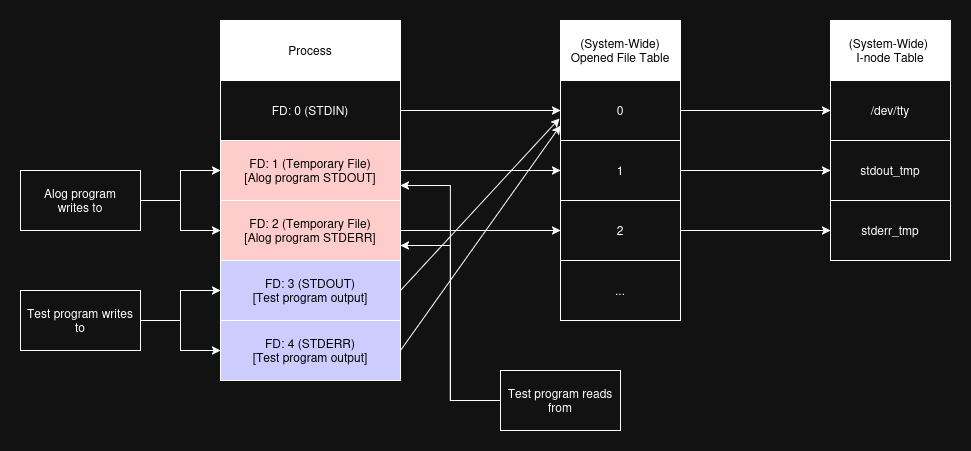
The main alog program uses the FILE stream pointers to refers to the STDIN, STDOUT, and STDERR File Descriptors; This is because it's easier for the main program to work with the standard library's fprintf(stream, format, ...) and fscanf(stream, format, ...) functions, rather than having to worry about keeping track of string length with the system calls write(fd, buf, len) and read(fd, buf, len). FILE is an object that refers to an opened file. Within the object, it stores the File Descriptor it refers to.
In my test program, I create and open 2 temporary files. These temporary files are created using the mkstemp(template) standard library function. The function takes a file name string that ends with the 6 characters XXXXXX, and replace those characters with a string to make the file name unique. The function then opens that file in READ/WRITE mode and return a File Descriptor referring to the opened file. Using another standard library function call freopen(pathname, mode, stream), I re-open the FILE streams stdout and stderr to point to the temporary files.
One thing to note about freopen(pathname, mode, stream) is that it also close the underlying File Descriptor of the FILE stream. This means that the STDOUT/STDERR File Descriptors (and its opened file handles) are closed by the function. Therefore, to make sure that (in step 2.) the test program can still output its result to the Standard I/O STDOUT/STDERR, the underlying opened file handles of the STDOUT/STDERR File Descriptors need to be saved. The system call dup(fd) can be use to duplicate the File Descriptors and save the opened file handles from being removed. This prevents the opened file handles from being removed when freopen(pathname, mode, stream) is called, because an opened file handle is only removed when all File Descriptors referencing it has been removed.
The code snippet below shows how this is all done. Note that even though the main alog program only writes to stdout/stderr, the temporary file is being opened in read and write mode ("r+"). This is because the underlying File Descriptors in the stdout/stderr FILE streams will be use by the test program to read alog program results.
/* File name templates.
   Must be character arrays (not pointers).  */
char tmp_out_fn[PATH_MAX] = "tmp_out_XXXXXX";
char tmp_err_fn[PATH_MAX] = "tmp_err_XXXXXX";

/* Creating the temporary files.  */
int tmp_out_fd = mkstemp(tmp_out_fn);
int tmp_err_fd = mkstemp(tmp_err_fn);

/* Close the temporary file's FDs because
   they're not needed.  */
close(tmp_out_fd);
close(tmp_err_fd);

/* Save the Standard I/O STDOUT/STDERR opened
   file handles.

   This is done so that the test program can
   still output its result to the Standard I/O
   STDOUT/STDERR.  */
int saved_stdout_fd = dup(STDOUT_FILENO); /* FD: 3  */
int saved_stderr_fd = dup(STDERR_FILENO); /* FD: 4  */

/* Close and re-open the stdout/stderr FILE streams
   to point to the temporary files.  */
freopen(tmp_out_fn, "r+", stdout); /* FD: 1  */
freopen(tmp_err_fn, "r+", stderr); /* FD: 2  */
Now the alog program is outputting its results and messages to the 2 temporary files. The next step is for the test program to read from these files.
My test program uses the read(fd, buf, len) system call to read alog program's output data. The standard library function fileno(stream) is used to get the File Descriptor of a FILE stream.
int alog_stdout_fd = fileno(stdout); /* FD: 1  */
int alog_stderr_fd = fileno(stderr); /* FD: 2  */

int bytes_read;
bytes_read = read(alog_stdout_fd, out_buf, out_len);
bytes_read = read(alog_stderr_fd, err_buf, err_len);
Given that the test program is using the same File Descriptor as stdout and stderr FILE stream pointer, then that means that they're sharing the same opened file handle in the system-wide opened file table. Every write(fd, buf, len) calls done by the main alog program (through fprintf(stream, format, ...)) moves the file offset position in the opened file handle by the written number of bytes. For the test program to be able to read the written data before the current offset, the test program need to reset the offset value of the opened file handle. This can be done by the lseek(fd, offset, whence) system call:
lseek(alog_stdout_fd, 0, SEEK_SET);
lseek(alog_stderr_fd, 0, SEEK_SET);
The SEEK_SET constant indicate that the base-point to apply the offset to the fd is at the beginning of the file, therefore the code snippet above is moving the offset back to the beginning of the file. There are other SEEk* constants that can be use as well:
SEEK_CUR: Base-point to apply offset to is the current opened file handle offset.SEEK_END: Base-point to apply offset to is at the end of the file.After being able to read data from the alog program, the test program also need to clean up the data after each test case assertions, so that the next test case has a clean slate of stdout and stderr file to use. To do this, my test program truncates the 2 files and reset the opened file handle offset back to the beginning of the file once more:
ftruncate(alog_stdout_fd, 0);
ftruncate(alog_stderr_fd, 0);
lseek(alog_stdout_fd, 0, SEEK_SET);
lseek(alog_stderr_fd, 0, SEEK_SET);
The file seek calls are required because reading from a file also modifies the file offset.
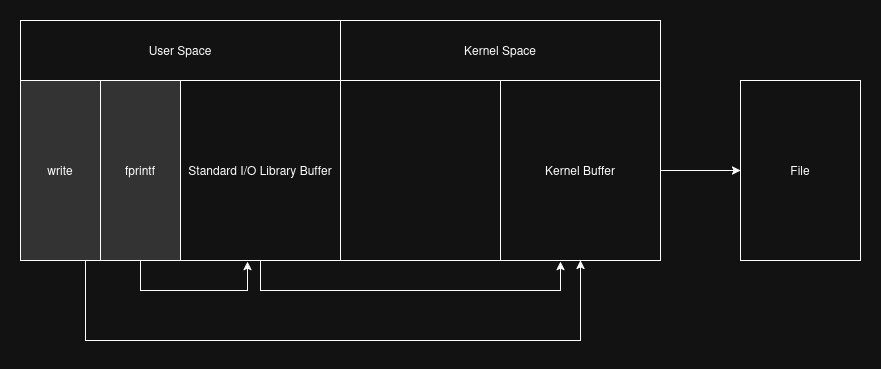
Lastly, there's the problem of I/O buffers. There are 2 types of I/O buffering at play in my program:
fprintf(stream, format, ...) etc.read(fd, buf, len) and write(fd, buf, len) etc.
When programs uses the system call write(fd, buf, len) to write data to a file, the data is transferred from the user-space memory to a buffer in the kernel space. The data doesn't actually get written to the target file immediately, but is done some time later by the kernel. This is a performance optimisation done by the kernel. Additionally, in the meantime any other process that opens and read from the same file will be reading the data from the kernel buffer while that data hasn't been written to the file yet.
The standard I/O library (stdio) also provide a similar functionality. Using functions such as fprintf(stream, format, ...) will store the data in stdio's buffer first, then it'll be transferred to a buffer in the kernel space some time later, then later be written to the target file. This causes some problem with my test program, because it need access to the output data from the alog program immediately for its test case assertions. To solve this, I've decided to disabled stdio buffering functionality and let the data from alog program be written to the kernel buffer via the underlying write(fd, buf, len) calls every time. This allows my test program to use read(fd, buf, len) calls to read alog's output data from the kernel buffer (or from the temporary files if the kernel buffer has been flushed).
I use the standard library function setvbuf(stream, buf, mode, size) to disable stdio buffer on the 2 FILE streams.
setvbuf(stdout, NULL, _IONBF, 0);
setvbuf(stderr, NULL, _IONBF, 0);
There's also the alternative approach of calling fflush(stream) everytime before doing a read on that file, but I found it cumbersome and chose to go with setvbuf instead.
To write the test results out to the standard I/O STDOUT and STDERR, I can simply use the saved STDOUT and STDERR File Descriptors. The original File Descriptors for STDOUT and STDERR are still available as File Descriptors 3 and 4. They've been duplicated earlier in step 1. However, my test program uses fprintf(stream, format, ...) to write out the test results, therefore I have to create FILE streams from the File Descriptors (note that the standard FILE streams stdout and stderr couldn't be used for the test program, because they've been reopened as temporary files for the alog program outputs.)
To create FILE streams from File Descriptors fdopen(fd, access_mode) is used:
test_prog_stdout = fdopen(saved_stdout_fd, "w");
test_prog_stderr = fdopen(saved_stderr_fd, "w");
Now the test program can simply use fprintf(stream, format, ...) to write the test results out to the terminal (or any other files, if the standard I/O has been redirected by the shell):
fprintf(test_prog_stdout, "PASSED\n");
fprintf(test_prog_stderr, "FAILED\n");
Since the test program now writes its results to STDOUT and STDERR, any I/O redirections done by the shell that creates the test program process will also redirects the STDOUT and STDERR File Descriptors used by the test program. Now I can do $ ./test-runner 1> test_out 2> test_err to redirect the test successful results to the test_out file and the failure results to the test_err file. I can also do $ ./test-runner 2>&1 | less to merge STDERR into STDOUT, then pipe STDOUT to the less program.
The approach described above wasn't the first approach that I used for the test program implementation.
The first approach I used was to manually open 2 new File Descriptors to the /dev/tty device file. These 2 new File Descriptors are used by the test program to write its passed and failed results to. Everthing was working fine until I wanted to do I/O redirections on test results from the shell. Since the new opened terminal device File Descriptors aren't the standard I/O File Descriptors, the shell has no way of manipulating them.
After I've finished implementing all the features I wanted for the first version of alog, I decided to start drafting this blog post along with reworking the test program I/O. Interestingly, before reworking the test program, I had another (less elegant) approach to workaround the issue, which was to implement in my test program a functionality similar to the program tee. tee is like a middleware that reads from its STDIN and writes to its STDOUT and files provided as argument. It can be used in a pipe like this: $ prog_1 | tee prog_result | prog_2, where the STDOUT result of prog_1 is saved in file prog_result before it is passed as STDIN to prog_2. I ended up not considering it any further than an idea, because like I said, it was a little less than elegant to implement it into the test program; Plus, it still wouldn't provide a universal I/O interface to the program to allow I/O redirections from the shell.
The first approach with /dev/tty is shown in the snippet below:
/* Close existing STDOUT/STDERR fd.  */
close(1);
close(2);

/* Replace STDOUT/STDERR fd with these new mem files.  */
memfd_create("stdout_mem", 0);	/* fd: 1  */
memfd_create("stdere_mem", 0);	/* fd: 2  */

/* fd within the stdout/stderr FILE* streams
   are the new mem files.  */
setvbuf(stdout, NULL, _IONBF, 0);
setvbuf(stderr, NULL, _IONBF, 0);

/* Open terminal device as 2 new fd for test results
   passed = STDOUT
   failed = STDERR  */
int test_prog_stdout_fd = open("/dev/tty", O_WRONLY);	/* fd: 3  */
int test_prog_stderr_fd = open("/dev/tty", O_WRONLY);	/* fd: 4  */

FILE* test_prog_stdout = fdopen(test_prog_stdout_fd, "w");
FILE* test_prog_stderr = fdopen(test_prog_stderr_fd, "w");

fprintf(test_prog_stdout, "PASSED\n");
fprintf(test_prog_stderr, "FAILED\n");
The second approach, which is quite similar to the current approach, is to use fdopen(fd, access_mode) on memory files and assign the returned FILE stream pointers to the stdout and stderr FILE streams. This approach enabled the I/O redirections from shell to function properly, however there was an issue with the program's portability. The stdin/stdout/stderr streams man page states that the FILE streams stdin, stdout, and stderr are macros, and that assigning to them is nonportable. This made the second approach nonportable, even though everything seems to be working fine. The recommended approach to updating the stdin, stdout, and stderr FILE streams is to instead use freopen(path, mode, stream). This portability issue ultimately resulted in the chosen approach that is the topic of this blog post.
The second approach with stdout and stderr FILE stream assignment is shown in the snippet below:
/* Create and open 2 new memory files.  */
int stdout_mem_fd = memfd_create("stdout_mem", 0);
int stderr_mem_fd = memfd_create("stderr_mem", 0);

/* Create a FILE streams from the memory files
   and assign them to the stdout/stderr
   FILE streams.  */
stdout = fdopen(stdout_mem_fd, "r+");
stderr = fdopen(stderr_mem_fd, "r+");
Had lots of fun implementing alog and its test program. Reworking the test program and making the shell's I/O redirection/piping function properly was definitely the highlight of the work. It was fun to see how alog and its test program evolves through the different approaches. Interestingly, this version of alog wasn't even the first implemented version. There was a prototype version before this one where alog is an interactive program.
Most of what I've learnt about the various user programs (e.g. tee) and how File Descriptors works come from reading the 2 books: "The Unix Programming Environment" by Brian W. Kernighan and Rob Pike, and "The Linux Programming Interface: A Linux and UNIX System Programming Handbook" by Michael Kerrisk. I highly recommend both books. Be warned though, the second book is quite thick.
https://github.com/thanakritlee/alog
https://github.com/thanakritlee/alog/blob/master/test/main.c